TTA Mobile Training မွအတန္းခြဲ အမွတ္စဥ္ (၁၄) သင္တန္း ကို (၁) လပိုင္း (၂၄) ရက္ေန႔ ၂၀၁၉ မွာစပါမယ္


Showing posts with label HTC. Show all posts

HTC ဖုန္းေတြအတြက္ Unlocker V1.7

Image


Password : Nokia.Firmware

or

အဆင္ေျပရင္ေအာက္ပါေၾကာ္ျငာကိုတစ္ခ်က္ကလစ္ခဲ့ပါ
++++++++++++++++++++++++++++++++++++++++++++++++++++ ++++++++++++++++++++++++++++++++++++++++++++++++++++ အဆင္ေျပပါေစ ေက်းဇူးတင္ပါတယ္

htc phone ေတြ အတြက္ rom ေတြ ကို လြယ္လြယ္ကူကူရွာဖို ့


http://www.androidruu.com/
အဆင္ေျပရင္ေအာက္ပါေၾကာ္ျငာကိုတစ္ခ်က္ကလစ္ခဲ့ပါ
++++++++++++++++++++++++++++++++++++++++++++++++++++ ++++++++++++++++++++++++++++++++++++++++++++++++++++ အဆင္ေျပပါေစ ေက်းဇူးတင္ပါတယ္

HTX Multi V1.0 Beta Tool Released.


Just a small gift for my friend to make your work easy.


Features:
HTC:-
HTC Bootloader Unlocking One Click.
Online CWM Installing.
HTC Relock Bootloader.
Partition Flashing (Recovery or Boot Etc).
CID Finder,Just enter your cid and it will let you region.
Reading info from rom.zip (Non Encrypt Rom Only).
Rebooting to recovery or fastboot vie adb.
Relocking Bootloader.
Reading Token For Manual Bootloader Unlocking.

ADB:-
Reading Info.
Wipe Data (Root Needed).
Multi APK Installer (You can install 10 20 100 in onces ).
Sideload,it will save your time while rooting htc or other phones,you can direct load supersu or other zip.

PS:HTC Bootloader unlocking supported with yahoo mail only,i will try to add more soon.

Requirement
Microsoft .net framework 4.0 Or higher required.

Downloads
LINK1 RBSoft

LINK2 RBSoft

More On The Way

Best Regards
Rahul_Bhutani


အဆင္ေျပရင္ေအာက္ပါေၾကာ္ျငာကိုတစ္ခ်က္ကလစ္ခဲ့ပါ
++++++++++++++++++++++++++++++++++++++++++++++++++++ ++++++++++++++++++++++++++++++++++++++++++++++++++++ အဆင္ေျပပါေစ ေက်းဇူးတင္ပါတယ္

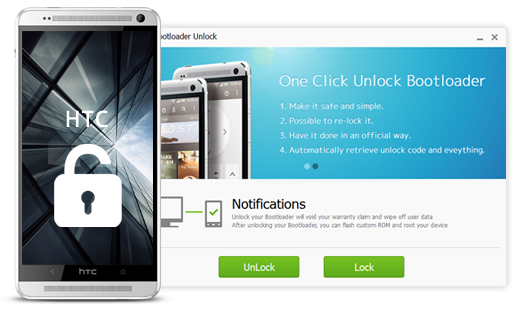
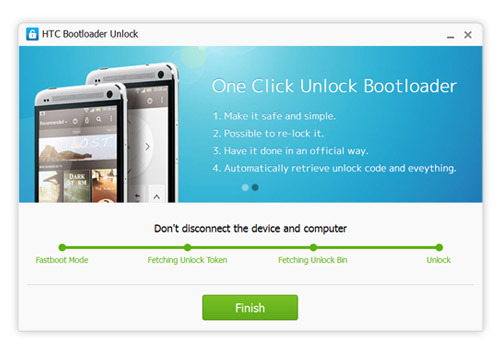
HTC One Click Bootloader Unlock လုပ္ႏိုင္မည့္ HTC Bootloader Unlocker

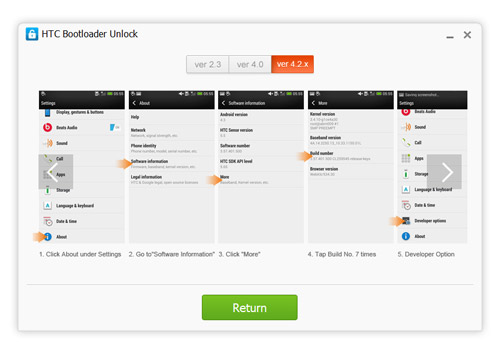
Enable USB Debugging

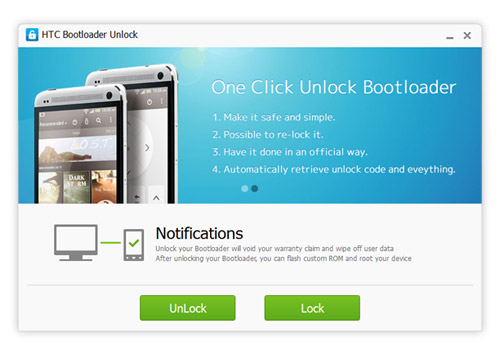
Read the Notifications

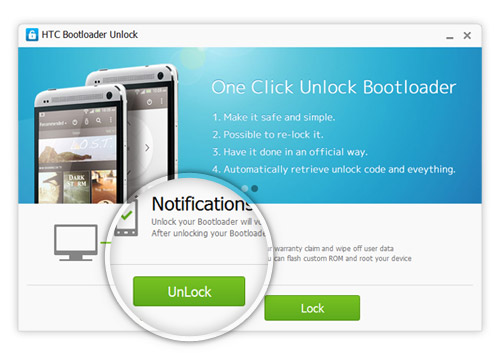
Click to Unlock

Unlock Succeeded!


 လိုအပ္ပါကေအာက္ကလင့္ခ္မွာ Download ႏိုင္ပါတယ္

Internet Connection လိုိအပ္ပါတယ္လုပ္ေနစဥ္အတြင္းမွာ

Download HTC Bootloader Unlocker

 
အဆင္ေျပရင္ေအာက္ပါေၾကာ္ျငာကိုတစ္ခ်က္ကလစ္ခဲ့ပါ
++++++++++++++++++++++++++++++++++++++++++++++++++++ ++++++++++++++++++++++++++++++++++++++++++++++++++++ အဆင္ေျပပါေစ ေက်းဇူးတင္ပါတယ္

HTC Quick Root - For ALL HTC Devices

HTC Quick Root - For ALL HTC Devices
++++++++++++++++++++++++++++

Features:
Root Using Insecure 'Boot.img' (S-OFF Only) or Universal Exploit. (S-ON / S-OFF)
Option to Flash 'HBOOT' Image after Rooting, even if your device is 'S-ON'!
Verify MD5 Checksum of 'HBOOT' Image after backing up and after flashing.
Unroot Device by Patching 'adbd' binary as Insecure.
Root Tools to Clear Battery Stats and Dalvik Cache.
Reboot device to any mode after Rooting.
Execute Reboot commands independantly.
Thorough Error Checking and Stable ADB Framework implementation.
Includes BusyBox v1.20.2 and SuperSU v0.96

DOWNLOAD >> http://d-h.st/16r <<
MMSD

Htc Phone ေတာ္ေတာ္မ်ားမ်ားကို UnlockBootloader လုပ္ႏုိင္သည့္


ပံုမွာေဖာ္ျပထားတဲ့ Htc phone အမ်ဳိးအစားမ်ားကို ဒီေဆာ့၀ဲလ္ေလးတစ္ခုထဲမွာတင္ UnlockBootloader လုပ္လို ့ရပါတယ္။ဖုန္း၀ါသနာရွင္မ်ားႏွင့္ Service သမားမ်ားေဆာင္ထားသင့္ပါတယ္။လိုခ်င္ရင္ေအာက္တြင္ေဒါင္းႏုိင္ပါတယ္။

@Collection of Android ( COA )

Download Linkhttp://www.mediafire.com/?5591azi858xyz5r
http://www.myanmarmobileforum.com

HTC One M7 ကုိ Root လုပ္နည္း


ဟုတ္ကဲ့ ျမင္တဲ့ ၾကားတဲ့အတုိင္းပဲ  HTC One M7 ကုိ Root လုပ္လုိ႔ရေနပါျပီ။ တစ္ကယ္လုိ႔သင္ဟာ  HTC One M7 ကုိပုိင္ဆုိင္ထားတယ္ဆုိရင္ သင့္အတြက္ သတင္းေကာင္းေပါ႔။ကဲ  HTC One M7 ကုိ Root လုပ္နည္း ကုိၾကည့္ရေအာင္။

ဒီPost ေလးကိုသေဘာက်လို႕ ကၽြန္ေတာ့္ဆိုဒ္ရဲ႕ Post Admin ၾကီး ကိုေအာင္ေက်ာ္မိုး ဆီကေနသေဘာက်
လို႕မူရင္းအတိုင္းဘဲ ျပန္လည္မွ်ေ၀ေပးလိုက္ပါတယ္ဗ်ာ။
Credit to - Blogger A.K.M

HTC One M7 ကုိ Root လုပ္ရန္အတြက္ လုိအပ္ခ်က္မ်ား


    သင့္ရဲ႕  HTC One M7 ကုိ Unlock လုပ္ထားရပါမယ္။ HTCDev.com မွာသြားလုပ္ႏုိင္ပါတယ္။
    Fastboot and Driver Download > http://d-h.st/RvD
    Recovery Image Download > http://forum.xda-developers.com/showthread.php?t=2172979
    Superuser Zip File > http://download.clockworkmod.com/superuser/superuser.zip

 HTC One M7 ကုိ Root လုပ္နည္း


    ပထမဦးဆံုး Fastboot package ကုိ Download လုပ္ျပီး Folder တစ္ခုထဲကုိ Extract လုပ္ထားပါ။


    သင္ၾကိဳက္တဲ့ Recovery image ကုိ Download လုပ္ပါ။ျပီးရင္ ‘recovery.img’ လုိ႔နာမည္ ေပးျပီး Fastboot package.exe ရွိတဲ့ထဲ ကုိ Copy Paste လုပ္ေပးထားပါ။


    SuperUser zip file ကုိ Download လုပ္ျပီး Phone ရဲ႕  SD Card ထဲကုိ Copy ကူးျပီးထည့္ေပးထားပါ။


    Phone ကုိ Power ပိတ္လုိက္ပါ။ျပီးရင္  Power button နဲ႔ Volume Down key ကုိတစ္ခ်ိန္ထဲမွာ ႏွိပ္ျပီး ‘Fastboot’ ဆုိတဲ့ Option ကုိ Power Button ကုိႏွိပ္ျပီး ေရြးေပးပါ။


    ‘Fastboot’ mode ထဲကုိ ေရာက္ျပီ ဆုိတာန႔ဲ အခုန  Fastboot package.exe ရွိတဲ့ေနရာ ကုိ သြားပါ။ ျပီးရင္ Shift ကုိဖိထားျပီး Right Click ကုိႏွိပ္ပါ။ေပၚလာတဲ့ Menu ထဲက 'Open command windows here' ကုိေရြးျပီး ေအာက္မွာ ေပးထားတဲ့ Command ကုိ Copy လုပ္ျပီး CMD ထဲကုိ paste လုပ္ေပးပါ။


fastboot boot recovery.img

    သင့္ရဲ႕ phone က custom recovery ထဲကုိ Boot ၀င္သြားပါလိမ့္မယ္။ SuperUser package ကုိ Install လုပ္ဖုိ႔အတြက္ ‘install zip from sdcard’ ကုိေရြးျပီး Install လုပ္ႏုိင္ပါတယ္။


    Install လုပ္လုိ႔ျပီးသြားတာ နဲ႔ Device ကုိ Reboot လုပ္ေပးပါ။Boot ျပန္တာလုိ႔ခ်င္ရင္ SuperUser app ကုိ လုိက္ရွာၾကည့္ ပါ။ေတြ႔ရင္ သင့္ရဲ႕  HTC One M7 ကုုိ Root လုပ္လုိ႔ျပီးသြားပါျပီ။ဒါမမဟုတ္ Root checker ကုိအသံုးျပဳျပီး စစ္ေဆးႏုိင္ပါတယ္။ဒါပဲ!!!


အားလံုးအဆင္ေျပၾကပါေစ။
http://www.myanmarmobileforum.com

One Click Action 1.0

One Click Action ( Bootloader Unlock, Installing ClockWorkMod, Installing Zaw Gyi Font non-root,Installing SuperUser)


One Click Action Program ေလးကိုုကၽြတ္ေတာ္ အလြယ္တကူသံုးလို.ရေအာင္လုပ္ထားတာပါ :D
တကယ္လို. One Click Action Program ေလးက Useful ျဖစ္တယ္ဆိုရင္ Version အသစ္တစ္ခုလုပ္မွာပါ။
Useful ျဖစ္တယ္မျဖစ္ဖူးဆိုတာ Phone User ေတြေျပာမွ သိမွာပါ :D

:o ဘာေလးျပန္ေျပာင္းသင့္လဲဆိုတာ အၾကံေလးေတြလည္းေပးၾကပါ။ ေ၀ဖန္ေပးၾကပါလို. ;)


One Click Action က ......

1.  HTC Bootloader Unlock လုပ္ရင္ command ေတြရိုက္စာရာမလိုေအာင္လုပ္ထားေပးတဲ့
     Program ေလးပါ။ဒါေပမဲ့ က်န္တဲ့ပာာေလးေတြပါထည့္လိုက္တယ္။
2.  Installing ClockWorkmod က HTC တစ္ခုတည္းမပာုတ္ပါဘူး က်န္တဲ့ Android
     ဖုန္းေတြမွာပါထည့္လိုရပါတယ္။
3.  Installing Zaw Gyi Font non-root က Zaw Gyi Font ကို Clockworkmod ကေနသြင္းတာပါ။
     Android Version 4.0 ေတြမွာ ထည့္လိုရၾကတယ္။
4.  installing SuperUser က Root သြင္းတာပါပဲ ဒါကိုလည္း Android Version 4.0 ေတြမွာသြင္းလို.ရၾကတယ္။


Download    http://www.mediafire.com/?ru1my3igmr4i1rw

password -  jogar
ref jogar

HTC ဖုန္းမ်ားအတြက္ Root Toolkit မ်ားပါ

HTC ဖုန္းမ်ားအတြက္ Root Toolkit မ်ားပါ
Amaze   
Desire C   
Desire S   
Desire V   
Desire X   
Droid DNA   
Droid Incredible 4G LTE   
Evo 4G LTE   
Explorer   
MyTouch 4G Slide   
One S   
One X
One X Plus   
One X/Evita
Rezound
Sensation   
Vivid   
Wildfire S 
Back to hasoon2000
Amaze 5 File(s)
Desire C 1 File(s)
Desire S 2 File(s)
Desire V 1 File(s)
Desire X 3 File(s)
Droid DNA 2 File(s)
Droid Incredible 4G LTE 3 File(s)
Evo 4G LTE 3 File(s)
Explorer 1 File(s)
MyTouch 4G Slide 1 File(s)
One S 8 File(s)
One V 4 File(s)
One X (International Model/Tegra 3) 2 File(s)
One X Plus 1 File(s)
One X/Evita (ATT/Roger/Telstra) 2 File(s)
Rezound 4 File(s)
Sensation 3 File(s)
Vivid 1 File(s)
Wildfire S
ref http://www.myanmarmobileforum.com

HTC ဖုန္းမ်ား BOOTLOADER UNLOCK လုပ္နည္း


Bootloader unlock မလုပ္ခင္သိထားရမွာက Factory Data reset ျဖစ္ပါလိမ့္မယ္ ဖုန္းထဲက Data အားလုံးကို SD card ကိုပို.ထားပါ။ Bootloader unlock လုပ္လိုက္ရင္ HTC ကေပးတဲ့ Warranty ပ်က္ျပီ။ ဒါေၾကာင့္မို႔ လုပ္ရင္ကိုယ္က auto သေဘာတူပါျပီ။

၁။ www.htcdev.com မွာ Register လုပ္ပါ။ Email လိပ္စာကို Unlock_code.bin ဖိုင္ပို.မွာပါ အဲဒါေၾကာင့္ Email လိပ္စာေသေသခ်ာခ်ာ ေရးေပးပါ။

၂။   www.htcdev.com/bootloader ကို၀င္ပါ။ ကိုယ္နွင့္သက္ဆိုင္တဲ့ ဖုန္းအမ်ိဳးအစားကိုေရြးပါ။ မရွိရင္ all other supported models ကိုေရြးပါ။  Begin  Unlock Bootloader ကို နိပ္ပါ။

၃။   HTC က သတိေပးစာတမ္းေတြ ေပးပါလိမ့္မယ္ Yes နိပ္ပါ။ အားလံုးကို အမွန္ျခစ္- Next ေတြနဲ.လုပ္ပါ။

= = = = = = = = = = = = = = = = = = = = = = = = = = = = = = = = = = = = = = = =

ကၽြန္ေတာ္ all other supported modelsလုပ္ ခဲ့တဲ့အတြက္ အားလံုးကတူရင္တူပါ လိမ့္မယ္။ တစ္ကယ္လို႕မ်ားမတူခဲ့ရင္  HTC မူရင္း  Unlocking Bootloader Instructions လုပ္နည္းနဲ. ကၽြန္ေတာ္ လုပ္နည္းနဲ. စစ္ျပီးလုပ္သြားရင္ ပိုေကာင္းပါလိမ့္မယ္

= = = = = = = = = = = = = = = = = = = = = = = = = = = = = = = = = = = = = = = =


အဆင့္ (၁)
======

ဘက္ထရီျဖဳတ္ျပီးျပန္တပ္ပါ ျပီးရင္ အဆင့္(၂) အတိုင္းသြားပါ။ ဒီလိုမကပဲ Power ခလုပ္ကိုဖိထားျပီး restart ကိုေရြးလိုက္ပါ။ Restarting ျပဳလုပ္ေနခ်ိန္အတြင္း volume down ကိုဖိထားျခင္းျဖင့္ Bootloader Mode ကိုတစ္ခါတည္းေရာက္သြားမည္။


အဆင့္(၂)
=====

Volume Down နဲ. Power ဖိထား ျခင္းျဖင့္ Bootloader mode ျဖင့္ စတင္၀င္ေရာက္ပါ။


အဆင့္(၃)
=====

Volume buttons ကိုအသံုးျပဳျပီး အေပၚေအာက္သံုးပါ။Fastboot ကို Highlight ျဖစ္ေအာင္ ျပဳလုပ္ျပီး Power button ကိုနိပ္ပါ။


အဆင့္(၄)
=====

ဖုန္း နွင့္ ကြန္ပ်ဴတာကို Usb ၾကိဳးျဖင့္ခ်ိတ္ပါ။


အဆင့္(၅)
=====

ကြန္ပ်ဴတာမွာ new folder တစ္ခုေဆာက္ပါ။ (ဥပမာအေနနဲ. : C:\Android ) ဖိုင္ ၃ ဖိုင္ကို new folder ထည္.ထားဖို.လိုအပ္ပါလိမ့္မယ္။ ဖိုင္ေတြက
                                  adb.exe
AdbWinApi.dll                                   fastboot.exe

ဒီအဆင့္မွာ

adb.exe,AdbWinApi.dll,fastboot.exe ဖိုင္သံုးဖိုင္ကို SDK Manager.exe နိပ္ျပီး Download ဆြဲခိုင္းတာပါ။ android-sdk_windows.zip  မွာ SDK manager.exe ပါပါတယ္။ ဖိုင္ Size 32.2 MB (33,803,391 bytes) ေလာက္ရွိပါတယ္။

To find these files : အဆင့္ (a) (b) (c) ခြဲထားပါတယ္။ အဲဒီအတိုင္းလုပ္နိုင္ပါတယ္။ ဒါေပမဲ့ ဖိုင္ ၃ဖိုင္ေလာက္နဲ. ဒီေလာက္ၾကီး Download ဆြဲမေနေတာ့ပါဘူး။

Download ဖိုင္သံုးဖိုင္ကို zip နဲ.ခ်ဳပ္ထားပါတယ္။ zip ျဖည့္ ျပီး  C:\Android  သို.ပို.ပါ။


အဆင့္(၆)
=====

command prompt ကိုဖြင့္ပါ။ ( Start > Run > Type CMD )

ဒါမွမပာုတ္

cd c:\Android လို.ရိုက္လိုက္ပါ။(ဒါမွာပာုတ္ Windows Explorer ကေန Android (folder)ကို
shift+right click နိပ္ျပီ open command windows here ကိုနိပ္လိုက္ရင္ အဆင့္(၈)ကိုေရာက္သြား
ပါမည္။)


အဆင့္(၇)
=====

unzip လုပ္ျပီး ကိုယ္သတ္မွတ္ ထားေသာ Floder မွာထားထားပါ။ (ဥပမာအေနနဲ. c:\Android လို.သတ္မွတ္ပါတယ္ ေနာက္ျပီ Command  Prompt မွာ cd c:\Android လို.ရိုက္လိုက္ပါ)

ဒီအဆင့္မွာ

        အဆင့္(၅) ကဖိုင္ ၃ဖိုင္ေတြ c:\Android မွာထား Command Prompt (CMD) မွာ  cd c:\Android လိုရိုက္ပါ။


အဆင့္ (၈)
======

CMD မွာ fastboot oem get_identifier_token လို. ရိုက္ပါ။


အဆင့္ ( ၉ )
=======
TOKEN COPY ကို ေသေသခ်ာခ်ာ ကူေပးပါ

Token ေတြေပၚလာပါျပီ ။ ေပၚလာတဲ့ Token ေတြကို   <<<< Identifier Token Start >>>>
မွစျပီး  <<<<< Identifier Token End >>>>> အဆံုးထိ ေရြးျပီး Right Click > Mark > highlight the block of text > Right click to copy နိပ္ျပီး (အဆင့္ ၁၀ သို. .......)


အဆင့္( ၁၀ )
=======

My Device Identifier Token: ဆိုတဲ့ေနရာမွာ Past လုပ္ပါ Submit နိပ္ျပီး Email က unlock code binary file ကိုလက္ခံထားပါ။ (Anti-virus သတ္တဲ့ Software ေတြ.ခဏေတာ့ပိတ္ထားေပးပါ)


အဆင့္ ( ၁၁ )
=======

Email ကရလာတဲ့ Unlock_code.bin ကို C:\Android ကိုပို.ပါ။


အဆင့္ ( ၁၂ )
=======

CMD မွာ fastboot flash unlocktoken Unlock_code.bin လိုရိုက္ပါ။


အဆင့္( ၁၃ )
=======

ဖုန္းမွာ disclaimer ေပၚလာတာကိုၾကည္ပါ။ Volume ခလုတ္ျဖင့္ Yes ကိုေရြးပါ။ ကိုယ္ဖုန္းထဲမွာ Data ေတြ factory default settings ျဖစ္လိမ့္မယ္ ့ျပီးရင္ Bootloader Mode မွာ Unlock လို ေပၚရင္ Bootloader Unlockလုပ္တာ ျပီးဆံုးပါျပီ။


အဆင့္( ၁၄ )
=======

Bootloader ကို Lock ျပန္လုပ္လိုလွ်င္ အဆင့္( ၁၂ ) က CMD မွာ fastboot oem lock ရုိက္ျပီး Re-Lock ျပန္လုပ္လိုရပါတယ္။


BOOTLOADER UNLOCK လုပ္တာျပီးဆံုးသြားပါျပီ


==========================================================


HTC ဖုန္းမ်ား ClockWorkMod သြင္းနည္းသို...................................


HTC ဖုန္းမ်ား Root မလုပ္ပဲ Zaw Gyi Font သြင္းနည္းသို.....................


================
MMAS - ၀င္းထြဋ္ေအာင္
MMUG - Jogar
================
thz

HTC Butterfly Clone Fonts

HTC Butterfly က Fonts ေတြတစ္ျခား Device မွာသံုးလို.ရေအာင္ Font Clone လုပ္ထားေပးပါတယ္။
Clockworkmod အတြက္ Update File ပါ။
အရင္ဆံုး ကိုယ္ Clone မလုပ္ခင္ ကိုယ့္ သံုးေနတဲ့ Font ကို Backup လုပ္ထားသင့္ပါတယ္။
ေနာက္တစ္ခါျပန္သံုးခ်င္ရင္ ျပန္သံုးလို.ရေအာင္လို.ပါ။

Backup လုပ္ရမဲ့ File ေတြက

/system/fonts က Font အကုန္လံုး
/system/etc/fallback_fonts.xml
/system/etc/system_fonts.xml
/system/etc/fallback_fonts-ja.xml (Jelly Bean)


Android သည္ Open Source ျဖစ္ေၾကာင္း Google ကိုယ္တိုင္ထုတ္ျပန္ထားသည္။
ref: MMAS
Download https://www.box.com/shared/0wg95kesydon2utumuo4

HTC Butterfly Clone Fonts


HTC Butterfly က Fonts ေတြတစ္ျခား Device မွာသံုးလို.ရေအာင္ Font Clone လုပ္ထားေပးပါတယ္။
Clockworkmod အတြက္ Update File ပါ။

Download - http://www.mediafire.com/?dmztm8uv8bboizx

အရင္ဆံုး ကိုယ္ Clone မလုပ္ခင္ ကိုယ့္ သံုးေနတဲ့ Font ကို Backup လုပ္ထားသင့္ပါတယ္။
ေနာက္တစ္ခါျပန္သံုးခ်င္ရင္ ျပန္သံုးလို.ရေအာင္လို.ပါ။

Backup လုပ္ရမဲ့ File ေတြက

/system/fonts က Font အကုန္လံုး
/system/etc/fallback_fonts.xml
/system/etc/system_fonts.xml
/system/etc/fallback_fonts-ja.xml (Jelly Bean)


Android သည္ Open Source ျဖစ္ေၾကာင္း Google ကိုယ္တိုင္ထုတ္ျပန္ထားသည္
Resharing From JoGar

HTC ဖုန္းမ်ား Root မလုပ္ပဲ Zaw Gyi Font သြင္းနည္း


HTC ဖုန္းမ်ား Root မလုပ္ပဲ Zaw Gyi Font သြင္းနည္း
HTC ဖုန္းမ်ား Root မလုပ္ပဲ Zaw Gyi Font သြင္းနည္းကၽြန္ေတာ္ ဒီနည္းနဲ. HTC Sensation XE, HTC Desire HD နဲ. HTC ONE X မွာ စမ္းလုပ္ခဲ့တယ္။
အားလုံးက Android Version 4.0.3 မွာအဆင္ေျပၾကတယ္။
က်န္တဲ့ Version မွာအဆင္ေျပလား မစမ္းရေသးပါဘူး။တစ္ကယ္လို.တစ္ျခား Android Version မွာရခဲ့ရင္ Report ေလးေပးၾကပါ။

Download HTC Font (china font Modify) >>>>
http://www.mediafire.com/?bhy9qyf3omf75yl
(or)
http://www.mediafire.com/?yhreyswhn8bzfnx
၁။ http://forum.myanmarmobileapp.com/index.php?topic=79.0 (or) http://www.myanmarmobileapp.com/?p=15801 မွာ HTC ဖုန္းမ်ား Bootloader Unlock လုပ္နည္းနဲ. Unlock လုပ္ပါ။
၂။ http://forum.myanmarmobileapp.com/index.php?topic=80.0 မွာ HTC ဖုန္းမ်ား ClockWorkMod သြင္းနည္းနဲ. ClockWorkMod သြင္းပါ။
၃။ HTC Font ကို Download ဆြဲျပီး Memory card (SD) ထဲသို.ထည့္ပါ။
၄။ Bootloader ကေန Recovery မွ ClockWorkmod သို.၀င္ပါ။

၅။ ClockWorkMod>Install zip from sdcard > Chose Zip From sdcard ကေနတဆင့္ HTC font.zip
ကိုေရြးေပးျပီး Yes- Install HTC Font.zip ကိုေရြးလိုက္ျပီး Update လုပ္ပါ။
၆။ Done add Zaw Gyi Font(Jogar)! ေပၚရင္ HTC device Zaw Gyi Font သံုးလိုရသြားပါျပီ !!!!!!!!!!!
၇။ +++++Go Back++++ > reboot system now ေလးနိပ္ လိုက္ျပီး Reboot ျပန္လုပ္လိုက္ပါ။
အားလုံး OK စိုစိုေျပေျပနဲ. Zaw Gyi Font သံုးလိုရသြားပါျပီ။
Zaw Gyi Keyboard အတြက္ Forzen Keyboard
https://www.dropbox.com/s/yal6dyx2bomouh3/FrozenKeyboard%20upload%20by%20jogar.apk
 
ေၾကညာခ်က္ :Mobile Camp By Myanmar Mobile App Website (အေသးစိတ္ဖတ္ရႈရန္ ဒီေနရာကုိႏွိပ္ပါ) 
Re Sharing From MMAS

One Click Action 1.0

One Click Action ( Bootloader Unlock, Installing ClockWorkMod, Installing Zaw Gyi Font non-root,Installing SuperUser)


One Click Action Program ေလးကိုုကၽြတ္ေတာ္ အလြယ္တကူသံုးလို.ရေအာင္လုပ္ထားတာပါ တကယ္လို. One Click Action Program ေလးက Useful ျဖစ္တယ္ဆိုရင္ Version အသစ္တစ္ခုလုပ္မွာပါ။
Useful ျဖစ္တယ္မျဖစ္ဖူးဆိုတာ Phone User ေတြေျပာမွ သိမွာပါ

  ဘာေလးျပန္ေျပာင္းသင့္လဲဆိုတာ အၾကံေလးေတြလည္းေပးၾကပါ။ ေ၀ဖန္ေပးၾကပါလို.


အမွန္တကယ္တတ္ေျမာက္လိုသူမ်ားအတြက္ မုိဘိုင္းဖုန္းျပုျပင္ျခင္းဆုိင္ရာ Software ပိုင္းကို အေျခခံမွစတင္သင္ၾကားမယ့္ (၁) လျပတ္ သင္တန္း ကို ဆရာ Than Toe Aung ( TTA ) မွ သင္ၾကားေပးသြားမွာျဖစ္ပါတယ္ စာရင္းေပးသြင္းလိုသူမ်ား 09250248011 , 0941005703 သို႔ ဆက္သြယ္စာရင္းေပးသြင္းႏိုင္ပါၿပီ...