TTA Mobile Training မွအတန္းခြဲ အမွတ္စဥ္ (၁၄) သင္တန္း ကို (၁) လပိုင္း (၂၄) ရက္ေန႔ ၂၀၁၉ မွာစပါမယ္


Showing posts with label Flasher tools. Show all posts

Flashtool and sptool some disable commands


FlashTool v5.1236.00.00

CTRL+ALT+V Advanced Mode

CTRL+ALT+T Runtime Trace Mode
CTRL+ALT+A Test Mode
CTRL+ALT+B Skip BootRom Mode
AndyI
08.03.2013, 20:31
SP FlashTool v3.1248.0.sn96
CTRL+ALT+V Advanced Mode
CTRL+ALT+T Runtime Trace Mode
CTRL+ALT+B Skip BootRom Mode
CTRL+ALT+P Command Recording Mode
CTRL+ALT+L Encription
CTRL+ALT+C Certification Download Mode
CTRL+ALT+M Mark NAND Bad Blocks Mode

SP FlashTools Error 8038-4032

SP FlashTools Error 8038-4032
***********************
SP FlashTool 3.1113.0sn0 Solve Error 8038.7z 5.81 MB
http://d-h.st/vmox
================
mtk firmware ေတြတင္လို့ 8038 တို ့ 4032 တို့ အဲဒီ error တက္ရင္
သံုးဖို ့ပါ runtime mode ကို ၀င္ျပီး သား mod လုပ္ထား ျပ ုျပင္ထားေသာ
flashtool ေလးဆိုေတာ့ ေဆာင္ထားသင့္ပါတယ္
3.1113.0sn0_Solve_Error_8038.Error_4032.rar 8.14 MB
http://d-h.st/UWVf
https://drive.google.com/…/0B-20ytDJliz1eTNSR0w5X1…/viewlll…
----
PMT Change Error For SP Flashtool 5.13.rar 23.39 MB
http://d-h.st/TIFU
=======
Infinix_Flash_Tool_exe_Windows_V1.0.rar 28.33 MB
http://d-h.st/2SqR
========
SP_Flash_Tool_v5.1352.01.rar 52.26 MB
http://d-h.st/0Oo0
အဲversion က ေတာ္ေတ္ာ အဆင္ေျပတယ္
miracle backup file ေတြ ကို ေရးတာ
==========
SP_Flash_Tool_v5.1348.00.zip 28.84 MB
http://d-h.st/072k
https://usersfiles.com/7fgd8x4yaomg
https://userscloud.com/6k2m1e2dom5t
Credit ေပးပါသည္။

SP Flash Tool v5.1408.00 New Version Free Download


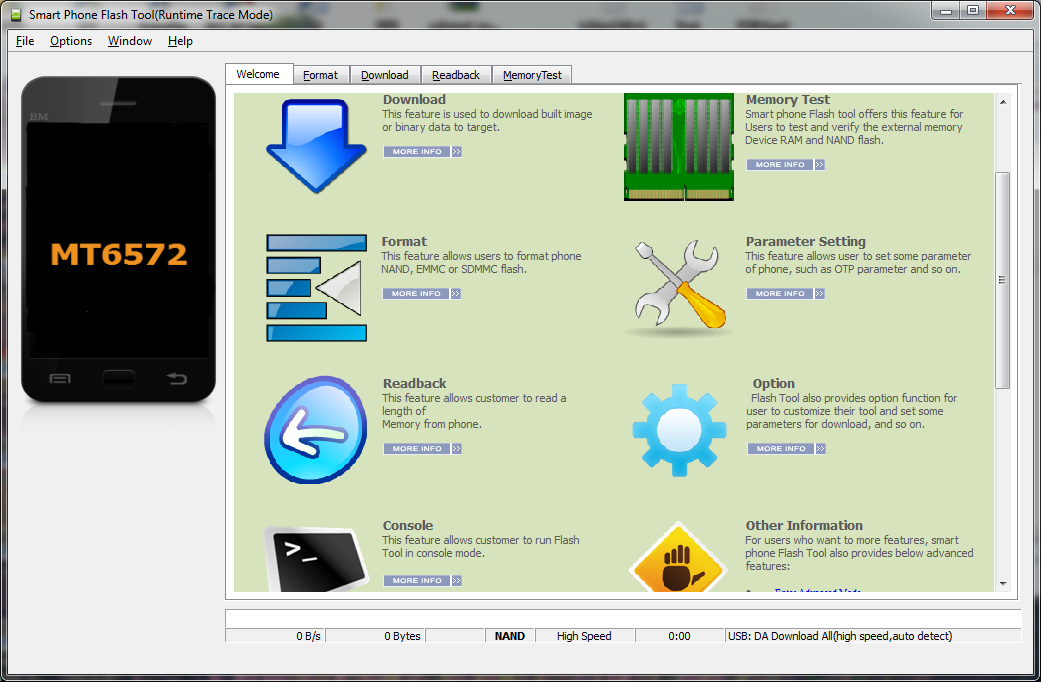
Smart Phone Flash Tool is a cross platform application that could download built images and binary data to MediaTek smart phone chips. Now it supports Win Xp 32bit and Ubuntu 10.4.

New Features/Enhancement:
* Intial Pre-Release for Linux platform
Bug Fixes:
* New int.
Limitations:
* Not support storage size larger than 4G


* Download
This feature is used to download built image or binary data to target.

* Memory Test
Smart phone Flash tool offers this feature for Users to test and verify the external memory Device RAM and NAND flash

* Format
This feature allows users to format phone NAND, EMMC or SDMMC flash.

* Parameter Setting
This feature allows user to set some parameter of phone, such as OTP parameter and so on.

* Readback
This feature allows customer to read a length of
Memory from phone.

* Option
Flash Tool also provides option function for user to customize their tool and set some parameters for download, and so on.

* Console
This feature allows customer to run Flash Tool in console mode.

ther Information
For users who want to more features, smart phone Flash Tool also provides below advanced features:

* FAQ
The FAQ provides some help for customer when they meet some problem using flash tool.


အဆင္ေျပရင္ေအာက္ပါေၾကာ္ျငာကိုတစ္ခ်က္ကလစ္ခဲ့ပါ
++++++++++++++++++++++++++++++++++++++++++++++++++++ ++++++++++++++++++++++++++++++++++++++++++++++++++++ အဆင္ေျပပါေစ ေက်းဇူးတင္ပါတယ္

Sony FlashTool version 0.9.18.1 Download


FlashTool_0.9.18.1 _1
To check firware on your handset, go to “Devices” > “Check Updates”
FlashTool_0.9.18.1 _2
This will bring up the Device Selector for you to choose your mobile.
FlashTool_0.9.18.1 _3
Now click on your phone variant which will load a list of customisation versions for various carriers & regions. Click on the version to find out the latest firmware version.
FlashTool_0.9.18.1 _5
Once you have chosen your firmware, you can start the download by double-clicking on the firmware. The message at the bottom of the screen will then change to “Decrypting FileSets” and then “Creating Bundle”.
FlashTool_0.9.18.1 _6
This will then bring up the Bundler as seen in the screen below. Select all items on the left side of the screen, move it to the right and then click “Create” which will then create a FTF firmware file.
FlashTool_0.9.18.1 _9


အဆင္ေျပရင္ေအာက္ပါေၾကာ္ျငာကိုတစ္ခ်က္ကလစ္ခဲ့ပါ
++++++++++++++++++++++++++++++++++++++++++++++++++++ ++++++++++++++++++++++++++++++++++++++++++++++++++++ အဆင္ေျပပါေစ ေက်းဇူးတင္ပါတယ္

SP Flash Tool v5.1352.01 (အသစ္)

SP Flash Tool အသစ္ေနာက္ဆံုးထြက္ဘားရွင္းေလးေတြ႕တာနဲ႔တင္ေပးလိုက္ပါတယ္
လိုအပ္သူမ်ားေအာက္မွာ Download ယူႏိုင္ပါတယ္
Download
အဆင္ေျပရင္ေအာက္ပါေၾကာ္ျငာကိုတစ္ခ်က္ကလစ္ခဲ့ပါ
++++++++++++++++++++++++++++++++++++++++++++++++++++ ++++++++++++++++++++++++++++++++++++++++++++++++++++ အဆင္ေျပပါေစ ေက်းဇူးတင္ပါတယ္

MTK Flash Tool v. 5.1343.01 (18.10.2013)


Download
http://www.adsl4all.net/public/Cellulari_Tablet/Mediatek/Tools/SP_Flash_Tool_5.1343.01.zip
or
http://mtk2000.ucoz.ru/down10/SP_Flash_Tool_exe_v3.1344.0.212.rar

SP Flash Tool are for SmartPhone products
MT6573\72 Innovative Platform for Mainstream Smartphones
MT6575 Dual-SIM smartphone platform for the mainstream market
MT6577 1 GHz Dual-Core Smartphone Platform
MT6582 Quad-Core Cortex-A7 1.2GHz+CPU Smartphone Platform
MT6589 Quad-Core Cortex-A7 1GHz+CPU Smartphone Platform

MTK Flash Tool is for Feature Phone chips
MT6223 GSM/GPRS solution for ULC/ULC+ market
MT6235 GSM/GPRS/EDGE solution for Mainstream Multimedia
MT6236 GSM/GPRS/EDGE Feature- rich Multimedia solution
MT6238 GSM/GPRS/EDGE Premium Multimedia solution
MT6239 GSM/GPRS/EDGE Premium Multimedia solution
MT6250 Single- Chip GSM/GPRS/EDGE- RX entry- multimedia solution
MT6252 GSM/GPRS/EGPRS entry- multimedia single chip solution
MT6253 Single- Chip GSM/GPRS entry- multimedia solution
MT6255 Single- Chip GSM/GPRS/EDGE- RX Smart Feature Phone solution
MT6268 High- end EDGE/GPRS/WCDMA Feature Rich Multimedia Phone Solution
MT6276M HSPA Data Modem Solution
MT6516 EDGE/GPRS Feature Rich Multimedia Smart Phone Entry Solution

Download >> Latest Flash Tool {Version-0.9.10.2beta 5} [ The most important tool for rooting Sony Xperia] [No Need To Skip Ad]


Introduction to Flashtool {Features}
------------------------------------------

Flashtool is a flashing software that can be used to :
  1. Flash original Images (Android 1.6, 2.1, 2.3 Images)
  2. Root your phone
  3. Install Recovery, Busybox, custom kernels
  4. Clean your Rom (remove /system/apps apps of your choice) (Be careful, unless you really know what you do, do not modify the default list. This can make your phone stuck at the SE Logo)
  5. Clear dalvik cache
  6. Optimize (install of JIT v2) (Disabled in 0.4, will readd it as a plugin for 2.1 phones only)
  7. Customize (installs apps found in the custom/apps folder of the flashtool)
  8. Clean uninstalled (remove any references to system apps removed in the Clean (root needed) step)
  9. Edit any text file on the device
  10. Rebrand your device
To download Version[0.9.10.2beta 5] Flash Tool from Dev-Host link, Click Here ! {No Need To Skip Ad}

Steel Jelly {Chief Editor Of FullPremiumNowFree}
Credit To - Ko Phyo Nyi Nyi !
http://www.fullpremiumnowfree.com/2013/06/download-latest-flash-tool-version.html

Android_AIO_Flasher_1.40


ဒါေလး သိၾကလား......ကိုကို တို႔ ေရ..................
recovery.img တို႔ Boot.img တို႔ Flash လို႔ရတယ္................
ေနာက္ၿပီး...............firmware flash တာတို႔....rom တင္တာတို႔ Rom Backupလုပ္တာတို႔........
အမ်ားၾကီး က်န္ေသးတယ္.....Features ေတြ...Boot တတ္တတ္ခ်င္း
Pic ေတြလဲ Flash လို႔ ရေသးတယ္...................
ေအာ္ Bootanimation ေတြ လဲ Change လို႔ ရတယ္................
ကဲ ဘာလိုေသးလဲ ဦးၾကီးရာ...............

Download 
MMUG
အမွန္တကယ္တတ္ေျမာက္လိုသူမ်ားအတြက္ မုိဘိုင္းဖုန္းျပုျပင္ျခင္းဆုိင္ရာ Software ပိုင္းကို အေျခခံမွစတင္သင္ၾကားမယ့္ (၁) လျပတ္ သင္တန္း ကို ဆရာ Than Toe Aung ( TTA ) မွ သင္ၾကားေပးသြားမွာျဖစ္ပါတယ္ စာရင္းေပးသြင္းလိုသူမ်ား 09250248011 , 0941005703 သို႔ ဆက္သြယ္စာရင္းေပးသြင္းႏိုင္ပါၿပီ...